
Greenhouse Integration: Access Candidate Reports Directly from Greenhouse
We've improved the Testlify–Greenhouse integration to make candidate review faster and more efficient.
Previously, clicking "Go to Test" from Greenhouse downloaded a PDF report, requiring additional steps to review detailed candidate responses and assessment insights.
With this enhancement, recruiters can now access candidate reports directly from Greenhouse.
What's Changed?
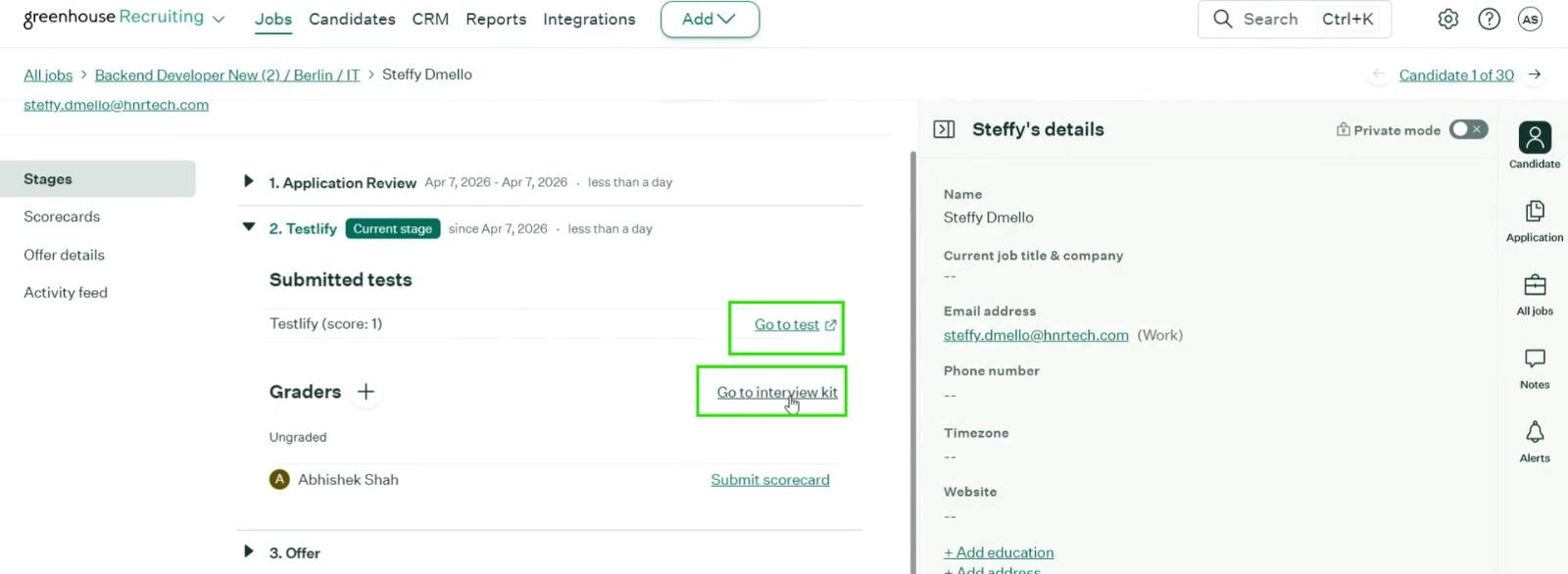
Go to Test
Previous Behavior
- Downloaded a PDF assessment report.
- Required recruiters to manually open and review the report.
- Limited visibility into detailed candidate responses.
New Behavior
- Redirects directly to the candidate's Testlify shareable report.
- Provides immediate access to:
- Candidate responses
- Assessment scores
- AI insights
- Proctoring information
- Detailed evaluation reports
View Report (Interview Kit)
New Behavior
- Clicking View Report from the Interview Kit also redirects directly to the candidate's Testlify shareable report.
- Recruiters can review complete assessment details without downloading a PDF.
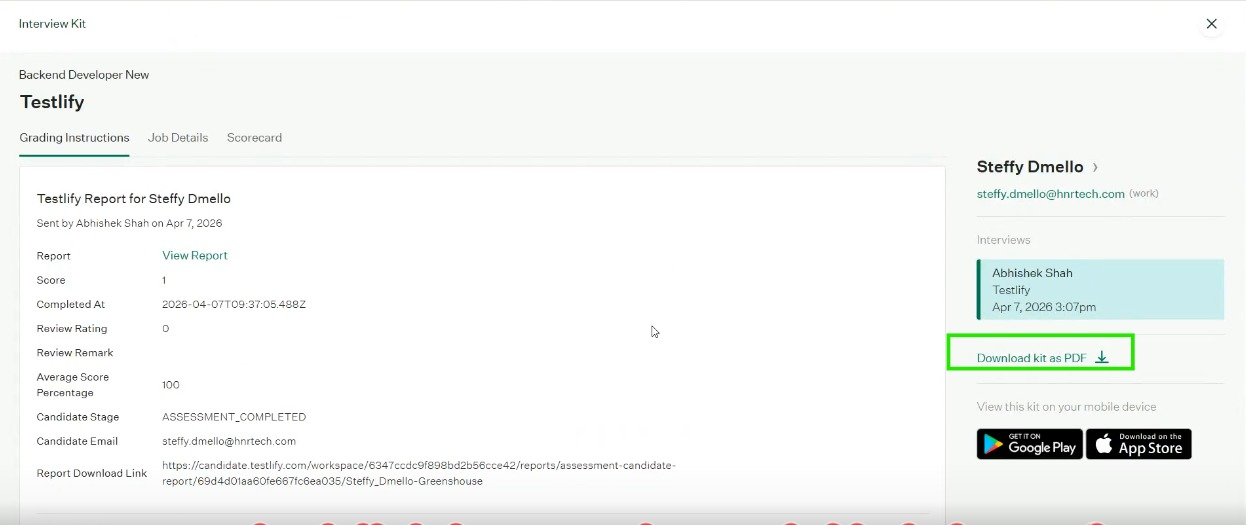
Report Download Link
A new field called Report Download Link has been added.
This allows recruiters to:
- Download the detailed PDF report when needed.
- Continue using PDF reports for record-keeping or offline review.
Candidate Report Access
The shareable report page includes:
- Assessment summary
- Candidate responses
- Question-by-question performance
- AI-generated insights
- Proctoring details
- Trust score information
- Coding submissions (where applicable)
- Video and Voice AI responses (where applicable)
Important Note for Existing Candidates
This enhancement applies to new candidate records created after the update.
For older candidates, the previous workflow remains unchanged:
- Go to Test will continue downloading the PDF report.
- Direct report redirection is not available for historical candidate records.
Benefits
Faster Candidate Review
Access detailed reports with a single click.
Better Hiring Decisions
Review complete candidate responses and evaluation insights directly within Testlify.
Reduced Administrative Effort
No need to download and manage multiple PDF reports during candidate evaluation.
Improved Recruiter Experience
Navigate seamlessly between Greenhouse and Testlify while reviewing candidates.
Frequently Asked Questions
Why does "Go to Test" still download a PDF for some candidates?
Candidates who completed assessments before this enhancement continue to follow the legacy workflow. Only newer candidate records support direct report redirection.
Can I still download PDF reports?
Yes. Use the Report Download Link field to download the detailed assessment PDF at any time.
Does this affect all Greenhouse users?
Yes. The enhancement is available for Greenhouse integrations using the updated workflow for newly created candidate records.
If you have any questions about your Greenhouse integration, please contact the Testlify Support team at support@testlify.com.