
Audible Countdown Alerts
Overview
This feature provides beep alerts to help candidates track time during assessments.
How It Works
When enabled, candidates will hear alerts at:
- 2 minutes remaining
- 30 seconds remaining
These alerts apply to:
- Full assessment (if timed)
- Timed sections
- Timed questions
Additionally, a beep will play at the start and end of audio/video recordings.
Important Notes
- Alerts won’t play during:
- Audio/video recording
-
Media playback
No alerts if:
- Total time ≤ 2 minutes (no 2-min alert)
- Total time ≤ 30 seconds (no 30-sec alert)
- Alerts won’t retry if skipped
Setting Details
- Location: Assessment settings → Configuration Tab
- Setting: Audible countdown alerts
-
Default: OFF
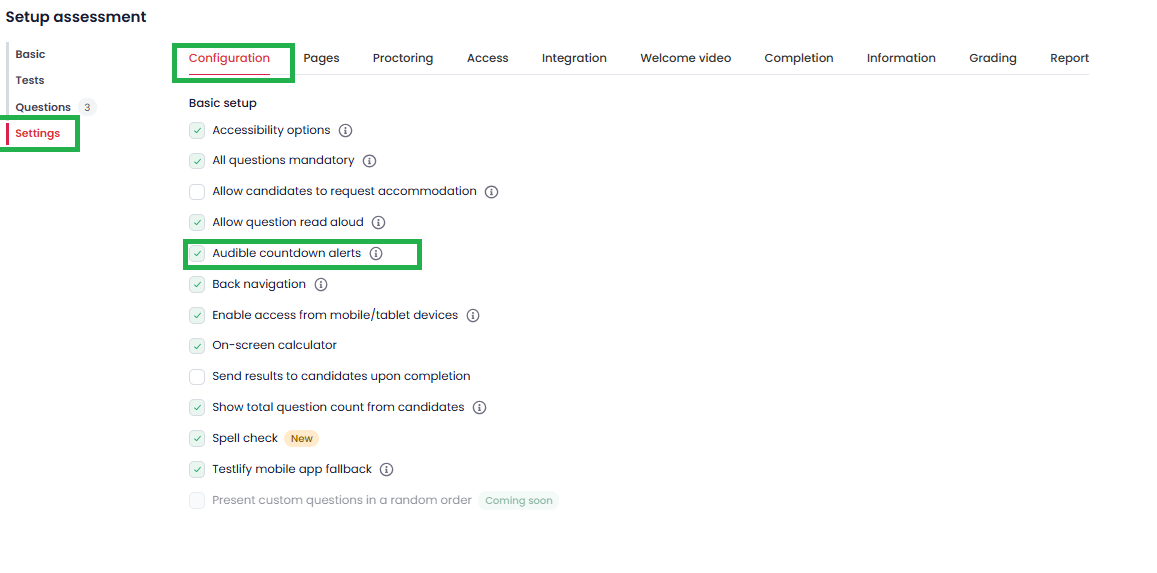
Once enabled, alerts apply across the entire assessment automatically.
Tooltip
“Beeps at 2 minutes and 30 seconds remaining in any timed section or question. Alerts are suppressed during recording or media playback.”