
Copy Custom questions as company Test
Copying Custom Questions as a Company Test
Introduction
If you’ve created custom questions inside an assessment and want to reuse them as a standalone Company Test, Testlify allows you to quickly convert any set of custom questions into a reusable test format. This ensures consistency across assessments and saves time when creating future tests.
Purpose
Copying custom questions as a Company Test allows employers to:
- Reuse custom-built content across multiple assessments
- Maintain a standardized internal test library
- Edit, archive, or update the copied test anytime
How to Copy Custom Questions as a Company Test:
1. Log In to Your Workspace
Sign in using your workspace credentials to access your Testlify dashboard.
2. Open the Assessment Containing Your Custom Questions
Navigate to the assessment where you initially added your custom questions.

3. Scroll to the Questions Section
On the assessment page, scroll down slightly until you see the Questions section.
You will find all custom questions you previously added.

4. Use the “Copy as Company Test” Option
On the right-hand side of the Questions section, click the three-dot menu next to your custom question set.
Select Copy as Company test.

5. Rename Before Copying (Optional)
A confirmation box will appear allowing you to rename the test before it’s copied.
If needed, update the test name and then click Make a copy.

6. Locate Your Copied Company Test
Go to the Library tab.
Under the Created By filter, select your workspace name.
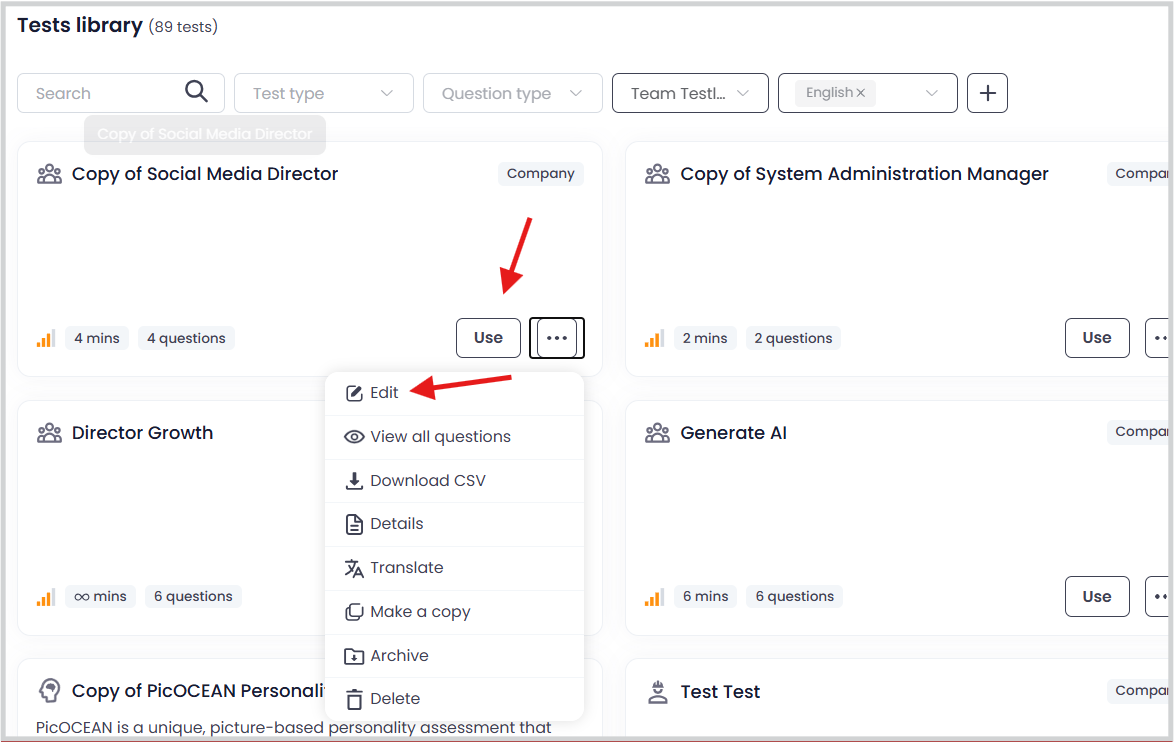
You will now see the newly copied Company Test in your library.

7. Start Using or Managing Your Test
You can now:
- Use it directly in any new assessment
- Edit the test
- View all questions
-
Archive or delete it as needed
Conclusion
The Copy as Company Test feature helps you turn any custom question set into a reusable, centralized Company Test. This makes managing content easier and ensures consistency across all assessments you create.