
Enable and Use Mouse Out Tracking
What is Mouse Out Tracking?
Mouse Out Tracking is a proctoring feature that detects when a candidate moves their cursor outside the assessment window. Every exit is logged and linked to the exact question the candidate was on at the time — giving you actionable evidence of potential integrity violations.
Note: Mouse Out Tracking does not apply to File Upload or Practical question types.
Before you begin
- You need Administrator access or assessment editing permissions.
- The assessment must already exist in your workspace.
Enable Mouse Out Tracking
- Log in to app.testlify.com with your registered email and OTP.

- Click the assessment name you want to configure.

- Click the Edit button to open assessment settings.

- Open the Settings tab, then select Proctoring.

- Toggle on Mouse Out Tracking and set the tolerance limit (in seconds) — this is how long the cursor can leave the window before an event is flagged. Click Save.

Tip: A tolerance of 3–5 seconds filters accidental cursor movements while still flagging deliberate exits.
View Mouse Out Tracking Logs
- From the Candidates list, click a candidate's name to open their result.

- Scroll to the Proctoring section.

- Find Mouse Out Proctor Violation and click View Logs.

- The log displays each mouse-out and mouse-in event with its exact timestamp and the question the candidate was on at that moment. Use this to determine whether a violation correlates with a specific question — the same way copy-paste logs tie pasted text to a question, and image violations tie snapshots to a moment in the assessment.
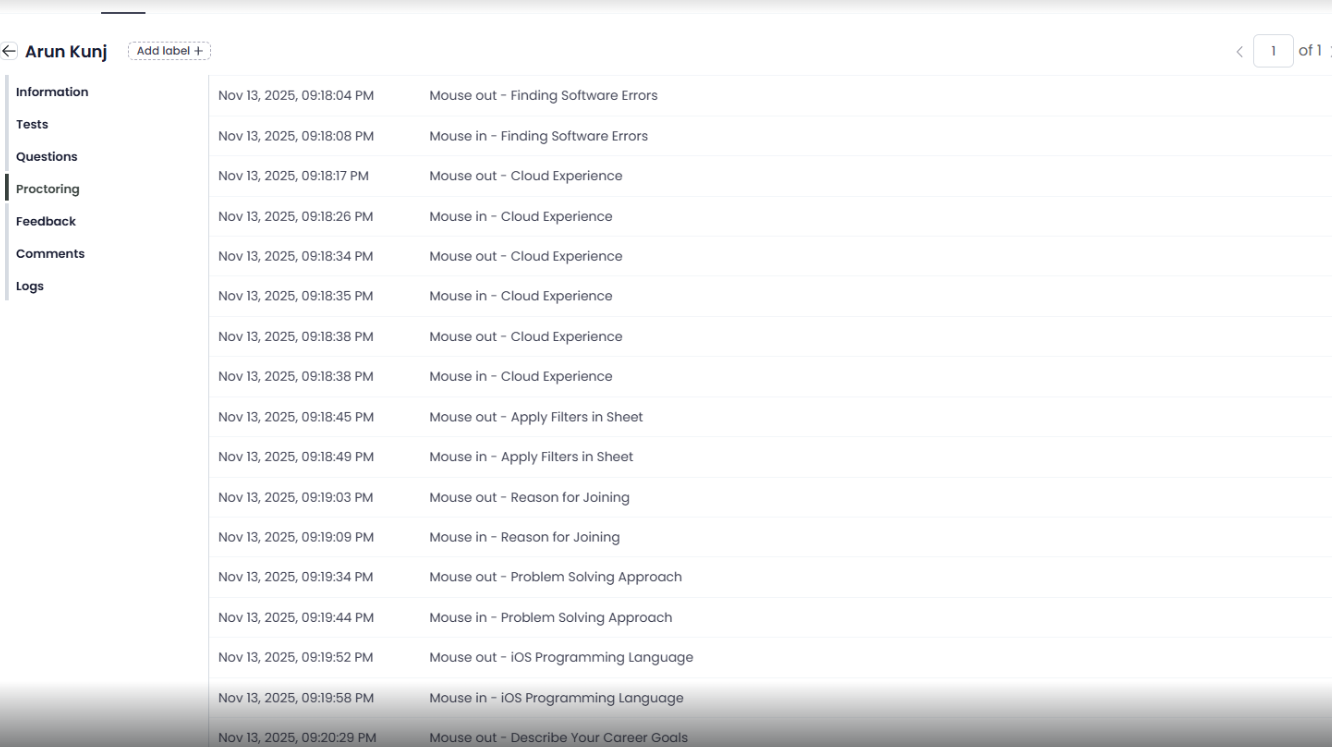
How Mouse Out Tracking works
Once enabled, Testlify monitors the candidate's cursor position throughout the assessment. Any exit from the browser window is recorded as a Mouse Out Proctor Violation in the candidate's report. Because each violation is tied to a specific question, you can quickly assess whether a candidate may have been looking for answers — and make more informed decisions about candidate integrity.
Need help? Contact support.